

For residents
Critical information. A clearer next step.
Lucas is the free resident app for time-sensitive public safety alerts from vetted departments. Know what is happening nearby, understand the action requested and share information that could help.
Free for residents. Vetted participating departments. Focused public safety alerts.
Know sooner.
Prompt safety notifications, with supported sound and urgency settings.
Understand the action.
A recognizable department, a relevant place and a clear request.
Contribute something useful.
Send relevant information through a supported tip route. Free for residents.
Follow the places that matter to you
Home is one part of your day. Work, family and travel can place you near other jurisdictions when a safety alert matters. Lucas lets residents follow more than one vetted participating department through one free citizen app, with each issuer identified.
Participation and available features vary by agency. A place appearing in our community directory does not mean its department is using Lucas.
Around a minute can make information more useful
Lucas is built to move a department’s time-sensitive message to residents quickly, often in around a minute. That is an approximate description of usual speed, not a fixed delivery promise. The issuing department’s actions, connectivity, device settings and supported notification features affect the timing.
A notification draws your attention to the full message. The message should make the affected area, current situation and requested action clear. Open it to distinguish an instruction to stay indoors from a request to share something you already know.
The resident app is free. A person should be able to receive a participating department’s safety information and use the available tip features without a resident subscription. Check current availability and the published consumer terms before installing.
A dedicated channel earns its place by staying relevant
Departments are vetted before joining the platform. That gives residents an identifiable agency source instead of an open feed in which anyone can present themselves as a police department. The channel is intended for timely safety information, with a clear reason to interrupt someone’s day.
Relevance helps preserve attention. Repeated messages that do not warrant an interruption can create alert fatigue, making later warnings easier to dismiss. Department verification and a focused publishing purpose support that distinction; they do not eliminate every possibility of error or replace other official warnings.
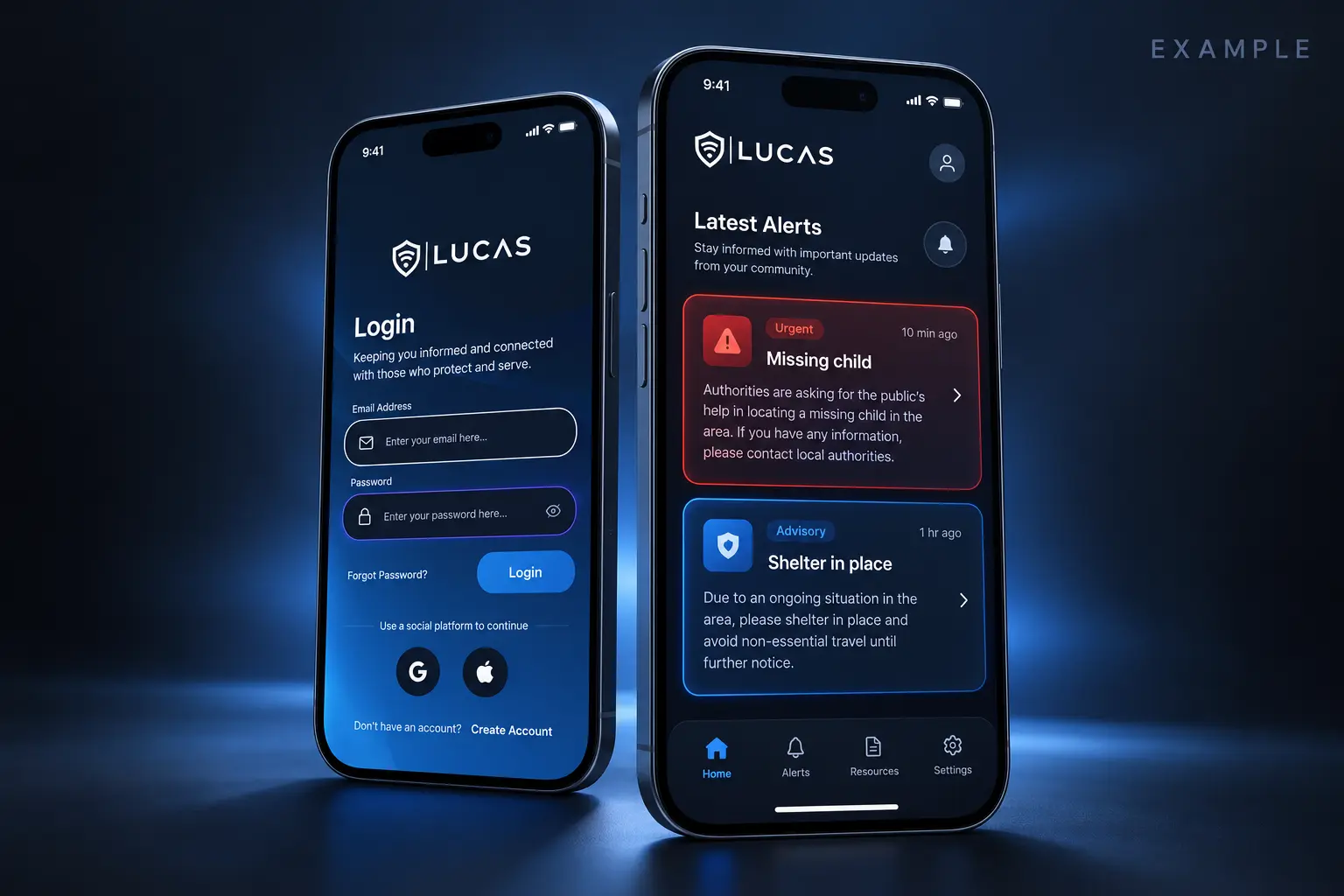
Illustrative interface · Fictional scenario
A safety message with a clear purpose.
The department name, place, time and requested action stay connected. A missing-child request can give residents a clear route to share relevant material they already have.
Follow the workflowFrom an alert to an informed contribution
A short notification can bring a matter to your attention. The detail behind it helps you decide whether it is relevant: which department is asking, what happened, which place is involved, and what information could help. Lucas brings that public information into a dedicated citizen experience instead of asking every message to explain the entire situation on a lock screen.
A useful connection runs in both directions. Where reporting is active, a resident can respond with a factual observation rather than a public comment thread. The selected agency receives the information through its own workflow; it decides what to do next.
The network follows relevance
Imagine reading a public request from a department near your workplace, then noticing something relevant while visiting family elsewhere. The information may still matter to the department that issued the request. Check the recipient and the available reporting feature rather than assuming your present city determines every useful connection.
That is the idea behind Lucas and Sentinel: a public experience that can span places, supported by distinct agency workspaces. Its usefulness grows through relevant participation, not through collecting a continuous account of everyone’s movements. Read the privacy policy before choosing permissions or sharing personal information.
Understand the information you receive
Participating departments use Lucas for consequential, time-sensitive public safety messages: a missing child, a nearby threat, a BOLO, a shelter instruction or an urgent request for information. It is not intended for routine event invitations or neighborhood conversation.
An update is a point in an evolving situation. Check its source and time, look for subsequent instructions, and continue to use official emergency channels.
Know the boundaries
Lucas is a communication platform, not an emergency dispatch service. Alert delivery and agency review are not guaranteed. If someone is in immediate danger or an urgent response is needed, call 911.
Before you get started
Confirm the department and the current app availability. Then review which sources are useful to you and what the reporting feature supports. A small amount of preparation makes the experience more useful: you know where an update comes from and where your information would go.
If you are preparing to use the service, read its published age and eligibility terms as well as the current app information. Availability and appropriate use are separate questions.
A routine that can cross city lines
You might live in one city, work in another and help a family member somewhere else. Those places can have different police service providers. Following an agency keeps its updates available in the same app without making every update a message from every department.
Start with the places you actually need to hear about. Check the department’s identity, confirm that it participates and review your choices when your routine changes. A long list of sources is less useful than a few sources whose role you understand. Keep the city or county’s official warning subscriptions as well; following an agency in Lucas is a separate choice.
The same distinction matters when you share information. A request may concern a place you have left, but your observation could still be relevant. Read the request again and check the intended recipient. A useful account explains the connection rather than leaving a reviewer to infer why the information was sent.
A notification gets your attention. The update gives you the detail.
An alert on a lock screen has limited room. Open the department’s update to understand the affected place, the time of publication and the requested action. If the situation has changed, a later correction matters more than a screenshot of the original message.
For example, a fictional notice about a safety perimeter could name the section that is closed and the point where drivers should turn away. Someone who knows the neighborhood and someone visiting for the first time should both be able to understand it. FEMA’s warning-message guidance emphasizes location, time, source and protective action; those are useful questions to bring to any public notice.
Not every update asks for a tip. Some simply provide information. If a request does invite observations, share what you know through the supported route. A public request is not an instruction to approach a person, enter property or look for evidence.
Before you send anything
Read your account as if you were receiving it for the first time. Include the place and approximate time, explain what you personally observed and distinguish it from what someone else told you. Say when you are uncertain. If an attachment is relevant, use an option supported by the current feature and keep the original file.
Check what the submission itself reveals. A photo can contain a face, address or reflection; a detailed account can identify its author even when some profile fields have limited visibility. The privacy setting and the information in the tip need separate consideration.
Lucas helps organize a connection between people and participating agencies. The agency decides how it reviews the information it receives. For urgent assistance, use emergency services rather than waiting for a tip to be seen.
Source: FBI: providing useful information in a tip · Lucas Privacy Policy, effective September 14, 2026
Sources and further reading
- FEMA: components of an alert and warning
- FBI: providing useful information in a tip
- Lucas Privacy Policy, effective September 14, 2026
- CISA: relevant, actionable public warnings
Page reviewed October 27, 2026. External guidance explains the stated topic; it does not establish a product outcome or endorsement.
Need help with availability, permissions or an account? Read Lucas help. For a barrier using this website, see accessibility and contact options.
Your next step